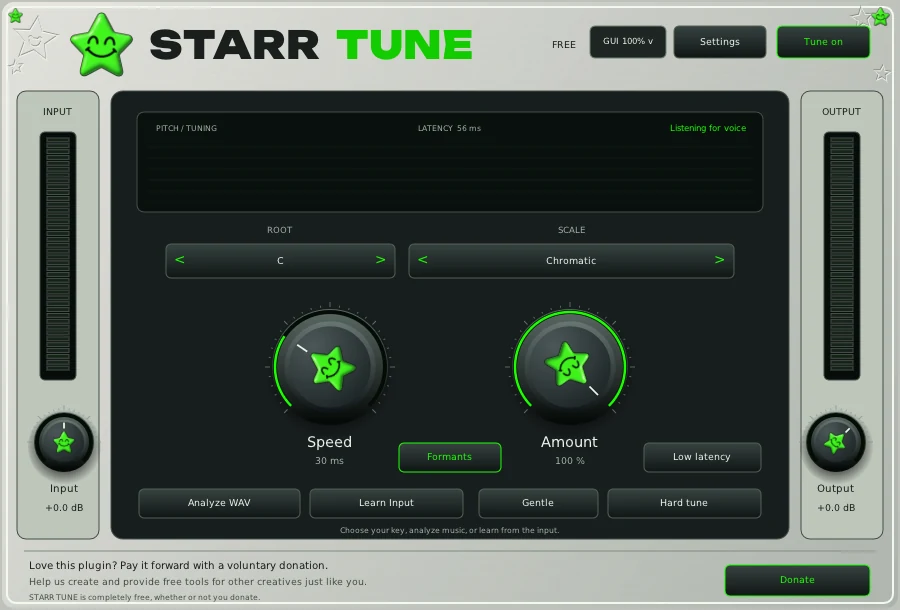
Hard tune for rap and trap
Speed 1 to 5 ms, Amount 100%, Formants on. The Hard tune button sets Speed 1 ms and Amount 100% in one click. This is the robotic snap between notes.
Melodic trap, the Travis Scott style sound
Start from hard tune: Speed 1 to 5 ms, Amount 100%, the exact key of the beat. Much of that sound comes after the tuner, from echo and space on the vocal; try STARR EFFECT or the space section in VOX after STARR TUNE.
Pop
Speed 10 to 25 ms, Amount 90 to 100%. Tight and polished, with enough time for each note to land before it is corrected.
R&B and runs
Speed 15 to 35 ms, Amount 70 to 90%. Slower and lighter so fast runs and riffs keep their movement.
Natural singing, worship and gospel
Speed 40 to 80 ms, Amount 40 to 80%, Formants on. The Gentle button sets Speed 40 ms and Amount 70%. The listener should hear the singer, not the tuner.
Deep and low male voices
Use the same recipe as your style, keep Formants on so the voice does not thin out, and mix with Low latency off: in low latency mode, correction eases off below about 80 Hz (E2).
Recording through it
Turn on Low latency while you record; the delay drops from about 56 ms to about 22 ms. Turn it off again for mixing if the part sits low.
Questions
What are the best autotune settings for rap?
In STARR TUNE: the key of the beat, Speed 1 to 5 ms, Amount 100% and Formants on, or press Hard tune.
What autotune settings sound natural?
Speed 40 to 80 ms and Amount 40 to 80%, with Formants on. The Gentle button is a good place to start.
What if I do not know the key?
Use Analyze WAV or Learn Input for a key suggestion, or choose Chromatic.
Auto-Tune is a registered trademark of Antares Audio Technologies. STARR plugins are independent and not affiliated with Antares. FL Studio, Pro Tools and Logic Pro are trademarks of their owners.