A focused tuning workflow.
Root, scale and formant controls keep the essentials together.
Starr TuneCompletely free
Key · Feel · Formants
The tuning engine from STARRBABY VOX, in its own focused plugin. Set your key, choose your feel, and keep creating.
Free.No license key. No subscription.
Every feature is free. No donation is required to download, install or use STARR TUNE.

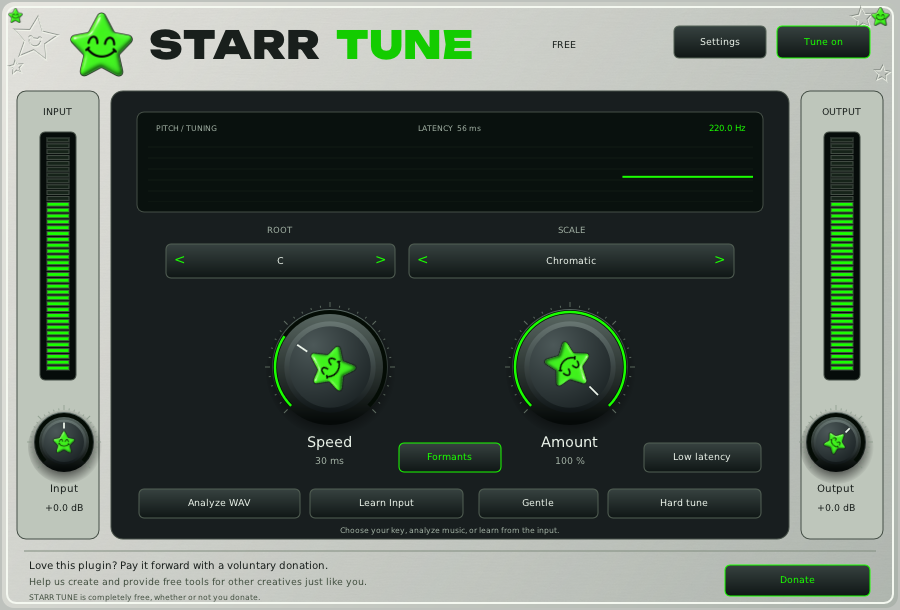
Root, scale and formant controls keep the essentials together.
Speed and Amount shape how strongly your vocal moves toward the selected notes.
Save your settings with your project. No account or activation is needed inside the plugin.

Already installed STARR TUNE? Get the latest update without signing up again.
First download? Leave your name, phone number and email to get the download links. Your registration is for download records and support; it does not sign you up for marketing texts.
Windows VST3 and AAX · Mac AU, VST3 and AAX
Windows 10+ or macOS 11+, Apple Silicon and Intel.
Includes Pro Tools (AAX) on Windows and Mac.
Designed for mixing: tuning adds 56 ms of latency. Start at 44.1/48 kHz and a 512 sample buffer.
Pay it forward. Help us create free tools for other creatives just like you.
STARR TUNE is completely free. This is a separate, voluntary donation.
Latest version 1.0.6
Already have STARR TUNE? Download the latest installer for your computer. No signup, payment or license key needed.
Windows 10+: VST3 and AAX · macOS 11+: AU, VST3 and AAX
Mac installer supports Apple Silicon and Intel. Pro Tools (AAX) is included on both platforms.
Back up important projects and test the update on a copy.
Choose a GUI size from 50% to 200%, or Fit screen. Your choice is remembered. This update also corrects Mac Pro Tools window sizing so the window follows the interface.
First time here? Get started with STARR TUNE.
New in 1.0.6: Choose your GUI size. Pick 50%, 75%, 100%, 125%, 150%, 200% or Fit screen from the plugin menu. The choice is remembered, with corrected Mac Pro Tools window sizing.
New in 1.0.5: High-resolution screens. Controls stay aligned with clicks when your DAW scales the interface, and the initial window fits the available screen space. Pro Tools (AAX) remains included on Windows and Mac, alongside VST3 and AU on Mac.
New in 1.0.3: Pick your key from a menu. Click the middle of Root or Scale to choose from a list; the arrows still step. STARR TUNE now checks for updates every time you open it, and Settings has a Check now button.
New in 1.0.2: Balanced header spacing. The star, STARR and TUNE now have matching gaps in the plugin header, including the compact view.
New in 1.0.1: Low latency mode. Switch it on to monitor through STARR TUNE while you record. The plugin's own delay drops from about 56 ms to about 22 ms; it expects the voice to stay above about 80 Hz (E2), and below that the correction eases toward your dry voice.
STARR TUNE checks for new versions while the plugin is open. When an update is available, choose Update ready to jump straight to the update installers above. No repeat signup is needed. You can also open Settings → Downloads / Updates at any time.
Close your DAW before running an update installer, then reopen your project. Automatic update checks can be switched off in Settings. Updates do not require a payment or license key.