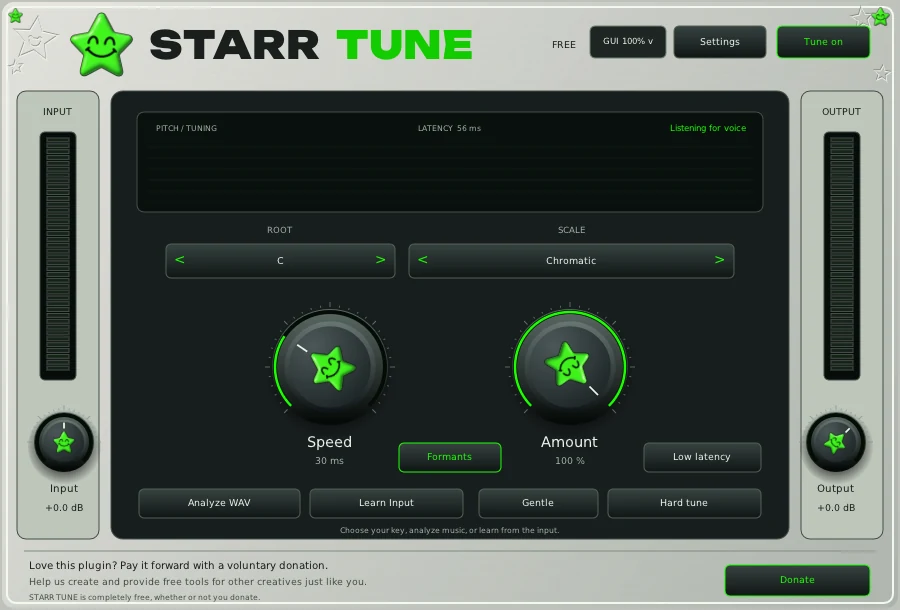
How to use autotune in Pro Tools
- Quit Pro Tools and run the installer for your computer.
- Open Pro Tools. It finds new AAX plugins when it starts.
- Click an insert on your vocal track and pick the STARR plugin from the plugin menu.
Tracking through STARR TUNE
For mixing, STARR TUNE adds about 56 ms of delay, which Pro Tools compensates during playback. To record through it, switch on Low latency: the delay drops to about 22 ms, for voices that stay above about 80 Hz (E2).
Presets in Pro Tools
The Vocal Collection loads as one full chain in FL Studio only. In Pro Tools, enter each plugin's settings from the included setup and parameter guide.
Build the chain
- STARR TUNE, free. Tuning first, on the dry vocal.
- STARR EQ, $29.99. Body, mid, presence and air.
- STARR COMPRESSOR, $19.99. One knob holds the vocal up front.
- STARRBABY VOX, $49.99. Tuning, dynamics, tone and space in one window.
- STARR EFFECT, in the bundle. Echo and atmosphere from one main knob.
Want all of it? The bundle has VOX, COMPRESSOR, EQ, EFFECT and all ten presets for $119.99. STARR TUNE stays free for everyone.
Questions
Is the AAX version extra?
No. Pro Tools (AAX) is included with every STARR plugin on Windows and Mac, and STARR TUNE is free in every format.
Can I record through STARR TUNE in Pro Tools?
Yes. Turn on Low latency in STARR TUNE to bring its delay down to about 22 ms while you track.
Auto-Tune is a registered trademark of Antares Audio Technologies. STARR plugins are independent and not affiliated with Antares. FL Studio, Pro Tools and Logic Pro are trademarks of their owners.