
Start with a recording you can hear clearly
Choose the quietest practical recording space and keep a consistent distance from the microphone. Check that the input does not clip on the loudest line. Record a short section, listen back with the instrumental and correct obvious problems before recording the whole song. A loud beat in the headphones can make you push the voice harder than you intended.
Keep an unprocessed take. It gives you a reference when deciding whether a plugin is improving the vocal or simply making it louder. You can record without hearing your processed voice if that is more comfortable; choose the monitoring setup that helps you perform naturally.
What does free STARR TUNE do?
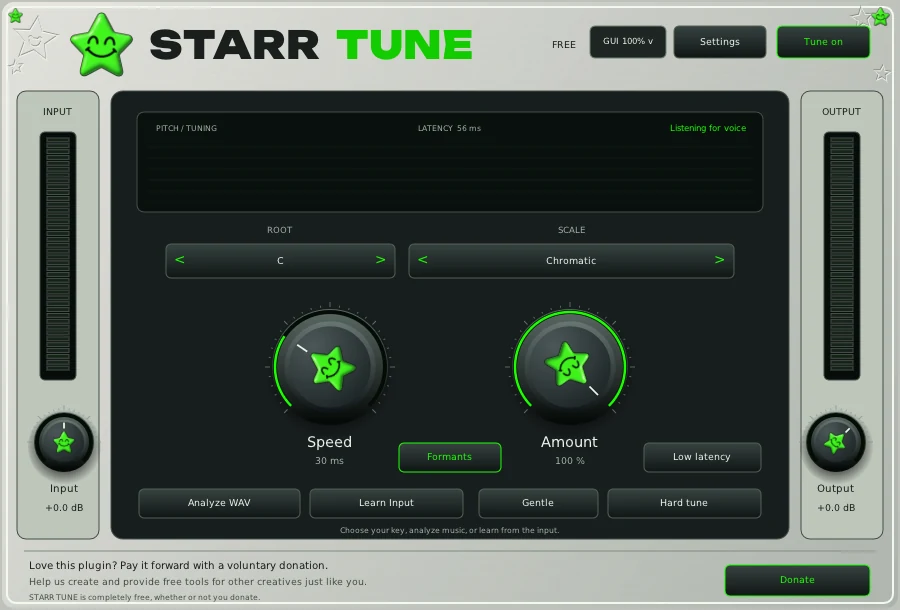
STARR TUNE is a vocal pitch correction plugin from STARRBABY WRLDWIDE. It is free, with no subscription or plugin license key required. The first download page asks for contact details and terms acceptance; optional marketing consent and donations are separate. Check the download page for current operating system and plugin format compatibility.
Pitch correction moves detected vocal notes toward the notes you allow. It will not write the melody, repair every pronunciation problem or remove room noise. Start with a performance whose delivery and message already work.
Set up the vocal in five steps
- Confirm the key. Ask the producer or check the instrumental. A wrong key can make a technically clean vocal sound wrong.
- Insert the plugin on the vocal track. Keep the instrumental separate so the tuning is responding to the voice you intend to process.
- Choose the scale and permitted notes. Follow the STARR TUNE setup guide for the actual controls.
- Adjust Speed and Amount by ear. Try a gentler setting for a natural phrase and a faster response when a deliberate tuned effect is part of the sound. There is no single setting for all Christian rap.
- Compare in the song. Listen with the beat, then bypass the effect. Check the ends of words, slides and transitions between sung and spoken lines.
For Spanish instructions, start with STARR TUNE: autotune gratis. Existing users can use the update link on the product page.
When do EQ, compression and other plugins help?
Use EQ when you can identify a tonal problem, compression when the vocal level varies more than you want, and ambience or effects when they serve the arrangement. Listen for a reason to add each processor. Your DAW's included tools may already cover the job.
The STARRBABY plugin collection lists the available vocal tools, EQ, compression and effects. Read each product's description and price before choosing it. Free TUNE does not make every plugin or bundle free, and a preset still needs adjustment for your voice and recording.
Get another listening perspective
Export a version and ask someone to focus on one issue, such as lyric clarity or the chorus vocal level. Rollout Heaven's Christian music feedback guide explains how to choose a host and prepare for a review. If you want to host your own stream, Rollout Heaven Live serves Christian creators; check its current pricing and requirements.
Before you submit, work through Madigan's song preparation checklist for the file, listening link and feedback question.
For listening ideas, explore Childlike CiCi's Christian hip hop discovery guide and the artists discussed there, including Scootie Wop. Use listening references to describe a quality you like, rather than assuming an artist used a particular plugin or preset.
Common questions
Can free pitch correction make a quiet or noisy recording sound finished?
It addresses pitch, not every recording problem. Improve the source recording and the balance of the mix before expecting a tuning effect to solve them.
Does Christian music need a particular tuning setting?
No. Decide how you want the performance to feel and keep the words understandable. The genre label does not determine the key, correction speed or amount.
Do I need to buy the other STARRBABY plugins to use TUNE?
No. STARR TUNE is a separate free download. Other products are optional and have their own terms.